 SyncCrate

The Sims 4 guide · Updated
Share Sims 4 mods and CC PC to PC.
Pass a legacy save to a friend, give the whole group the same CC, or move your Mods folder to a new laptop. SyncCrate copies the host's Mods, Saves and Tray folders to the other PC, and after the first time only new and changed files.
FreeOpen sourceNo cloudWin · macOS · Linux
// 01 Why
Why Sims 4 CC gets out of sync
The Sims 4 has no multiplayer, but a lot of people play it together anyway: a legacy challenge where friends take turns, a shared save where everyone moves in a household, or one player's CC collection that the rest of the group wants too.
It breaks as soon as the other PC is missing some of the CC. Hair and clothes fall back to defaults, lots arrive with gaps where custom objects were, and script mods like MC Command Center stop working because one PC still has last month's version. Sending a 20 GB Mods folder as a zip every time someone downloads something new doesn't scale.
SyncCrate keeps one PC as the host and makes the others match it. It compares every file by content, copies only what's different, and shows you the list before it changes anything.
// 02 What syncs
What SyncCrate syncs for The Sims 4
| Folder | Path in the game folder | Files |
|---|---|---|
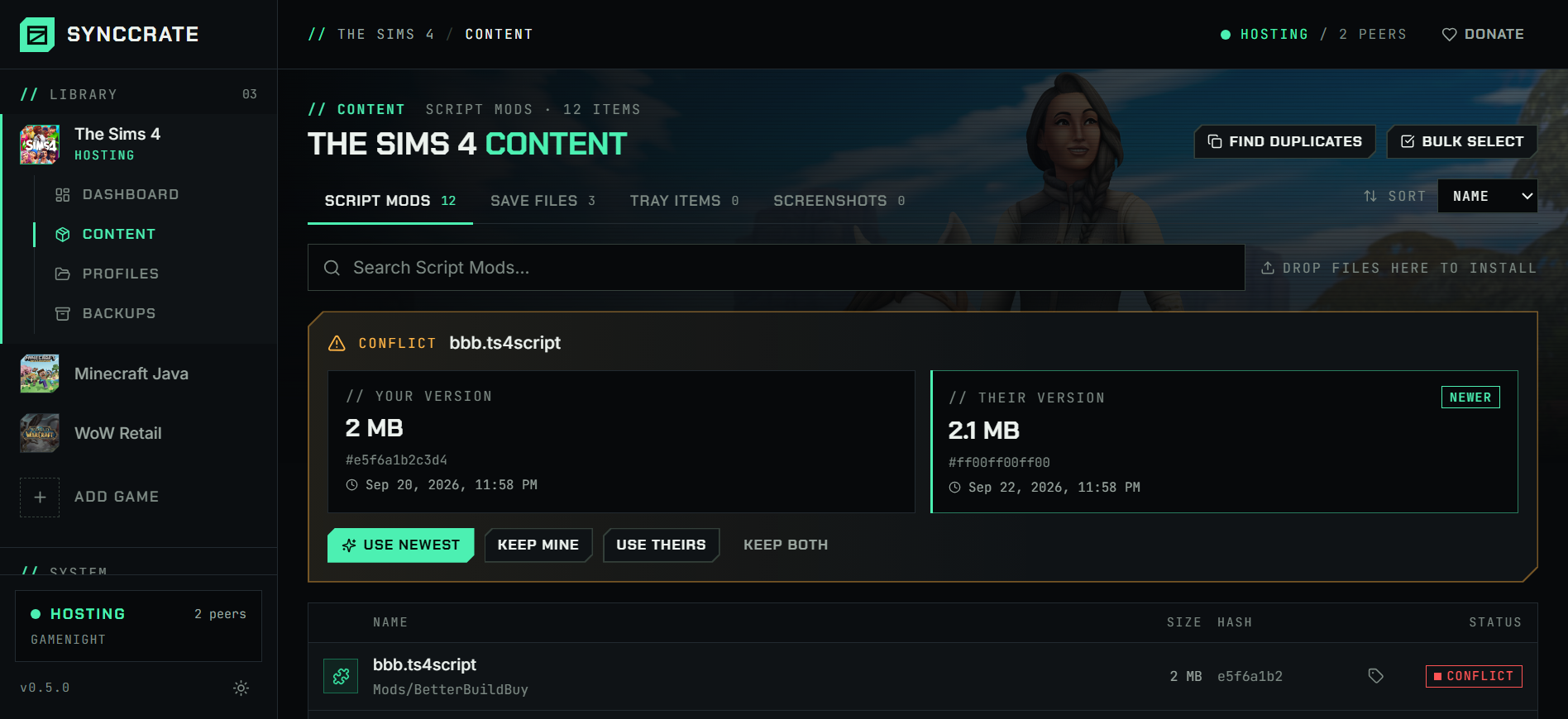
| Script Mods | Mods/CC (.package) and script mods (.ts4script), in whatever subfolders you use. The folder layout is copied exactly, so what loads on the host loads on the other PC. | .package .ts4script .zip .bpi .cfg .txt |
| Save Files | Saves/Save slots. When the same slot changed on both PCs you choose: keep mine, use theirs, or keep both. | All files |
| Tray Items | Tray/Households, lots and rooms saved to your library, so a friend can place the exact household you built. | All files |
| Screenshots | Screenshots/Optional. The host chooses which folders friends may sync, so screenshots can stay private. | All files |
// Where it looks
- Documents folder
Electronic Arts/The Sims 4inside your Documents folder- Anywhere else
- Point SyncCrate at the folder yourself, once
Built in for The Sims 4
- Script warnings.
.ts4scriptfiles run code on your PC, so they're flagged for you to review before they sync. - Disabling that sticks. Turning a mod off renames it to
.disabledin place, because the game also loads mods from subfolders. - Duplicate finder. Finds identical files saved in different folders.
- Cache cleared for you.
localthumbcache.packageis deleted after a sync brings in new files, so The Sims 4 rebuilds it. - Pack detection. Detect Packs lists the packs and DLC a PC has, and mods that look like they need one you don't have are flagged.
- Game-running warning. SyncCrate warns you before syncing while The Sims 4 is still open.
- Undo and history. Undo the last sync in one click, and put back any single file a sync replaced or deleted.
// 03 How it works
Sync The Sims 4 in three steps
Install and add the game
Install SyncCrate on every PC and add The Sims 4 in the Game Browser. Its folder is found automatically.
One PC hosts
The PC with the setup everyone should have clicks Start Hosting. The others pick it under Scan for Hosts on the same network, or paste its join code from anywhere.
Compare and sync
Check the list of new, changed and conflicting files, then Sync Now. Only the files that differ are copied, PC to PC.
TipClose The Sims 4 on the PC that's receiving files before you sync. SyncCrate warns you if the game is still running, because the game keeps mod files open and changes made underneath it don't take effect until a restart.
// 04 Common problems
When The Sims 4 mods don't match
Mods switched off after a game update
Most patches turn off Enable Custom Content and Mods and Script Mods Allowed in Game Options → Other. Everything is in the Mods folder, but nothing loads.
The mod health check reads the game's
Options.ini, tells you when either setting is off, and turns both back on in one click while the game is closed.Script mods too deep in subfolders
The game only loads
.ts4scriptfiles directly in Mods or one folder below it, and.packagefiles up to five folders deep. Anything deeper is silently ignored.The health check lists every file that's too deep to load, so you can move it up before anyone wonders why a mod is missing.
CC still inside a .zip
Downloaded CC often comes zipped. The game never loads
.packagefiles from inside a.zip, so the mod looks installed but isn't there in game.The health check looks inside
.zipfiles in Mods and flags the ones that still contain packages.Outdated script mods after a patch
After a game update, script mods usually need a new version, and a PC with the old one can crash or throw errors. Keeping every PC on the same version by hand is where groups get stuck.
The host updates the mod once. Everyone else syncs and gets only the changed files, with script files flagged for review first.
The same CC twice
Download the same item from two places and you end up with duplicate packages in different folders, which can cause conflicts and makes the folder bigger than it needs to be.
The duplicate finder on the Content page finds identical files in different folders, and the ones you remove stay in File history in case you change your mind.
Old thumbnails after new CC
The game caches thumbnails in
localthumbcache.package. After CC changes, stale thumbnails and missing icons are common until that cache is deleted.The cache file is deleted automatically after a sync brings in new files, and the game rebuilds it on the next start.
The same script mod twice
An updated script mod saved next to the old one, sometimes under a new name, means the game loads both copies, and mods like MC Command Center break in confusing ways.
The health check spots script mods that contain the same code, even when renamed, and Turn off older copies keeps only the newest.
A missing Resource.cfg
The Mods folder needs a
Resource.cfgfile that tells the game where to look for CC. Without it, or with an empty one, the game may not load your CC.The health check notices and writes the standard
Resource.cfgfor you. An old file is kept as a backup.
// 05 The Sims 4
Good to know
- Packs aren't copied. Expansion, game and stuff packs come from EA, so every PC needs its own. Detect Packs shows which packs a PC has, and CC that looks like it needs a pack you don't own is flagged.
- Your game settings stay yours. Only the Mods, Saves, Tray and Screenshots folders sync.
Options.ini, graphics settings and the game's cache files are never copied. - ReShade and GShade presets are a separate entry in SyncCrate (The Sims 4 (ReShade) or (GShade)), so you can share them or leave them out. Your own
ReShade.iniis never synced. - EA app, Origin or Steam doesn't matter: the Mods folder lives in Documents either way.
- Taking turns on one legacy save? Share it with your crew under Shared saves on the Dashboard. It then only moves when someone takes it or gives it back, never in a normal sync, so nobody plays an old copy. Friends connect from Crews or with the join code, not over the local network.
// FAQ
The Sims 4 questions
Does this add multiplayer to The Sims 4?
No. SyncCrate doesn't change the game. It makes sure another PC has the same mods, CC, saves and tray items, so you can take turns in the same save or play with the same setup.
Where is the Sims 4 Mods folder?
On Windows it's Documents\Electronic Arts\The Sims 4\Mods, and on a Mac ~/Documents/Electronic Arts/The Sims 4/Mods. SyncCrate finds it automatically, and you can point it somewhere else if you've moved it.
How do I move my Sims 4 CC to a new PC or laptop?
Install SyncCrate on both. Host on the old PC, join from the new one (on the same network it shows up under Scan for Hosts), then Compare & Sync. Files go straight from one PC to the other at local network speed, with nothing uploaded to the cloud.
Your later changes can be synced the same way, and only the new files are copied.
Do my friends need the same packs?
For CC that uses items from a pack, and for saves and lots built with packs, yes. SyncCrate can't copy packs, since they're tied to each person's EA account. It flags CC that looks like it needs a pack you don't have.
Is it safe to get script mods from a friend?
Script mods (.ts4script) run code on your PC, so SyncCrate flags them before they sync and nothing changes until you approve the list. Only sync with people you trust. If something goes wrong, Undo last sync puts your files back, and replaced files stay in File history.
Can a Windows PC and a Mac share the same CC?
Yes. SyncCrate runs on both and the Mods folder has the same layout, so a Windows host can sync to a Mac and the other way around. Keep in mind that a few script mods only support one platform.
// Related game guides
All games · SyncCrate supports 100 games.
// Free · Open source · Windows, macOS, Linux
Same The Sims 4 setup on every PC.
Install SyncCrate on each PC, one of you hosts, everyone else joins. No accounts, no cloud, nothing uploaded anywhere.