SyncCrate

v0.7.1 Built for co-op squads & LAN parties

Same mods. Every PC. No excuses.

One mismatched mod and nobody can join. SyncCrate makes every PC match the host, copying only the files that differ, PC to PC. At a LAN party one PC feeds the whole room at LAN speed, even with no internet. From home, it's one join code. No cloud, no accounts.

FreeOpen sourceLAN works offlineWin · macOS · Linux

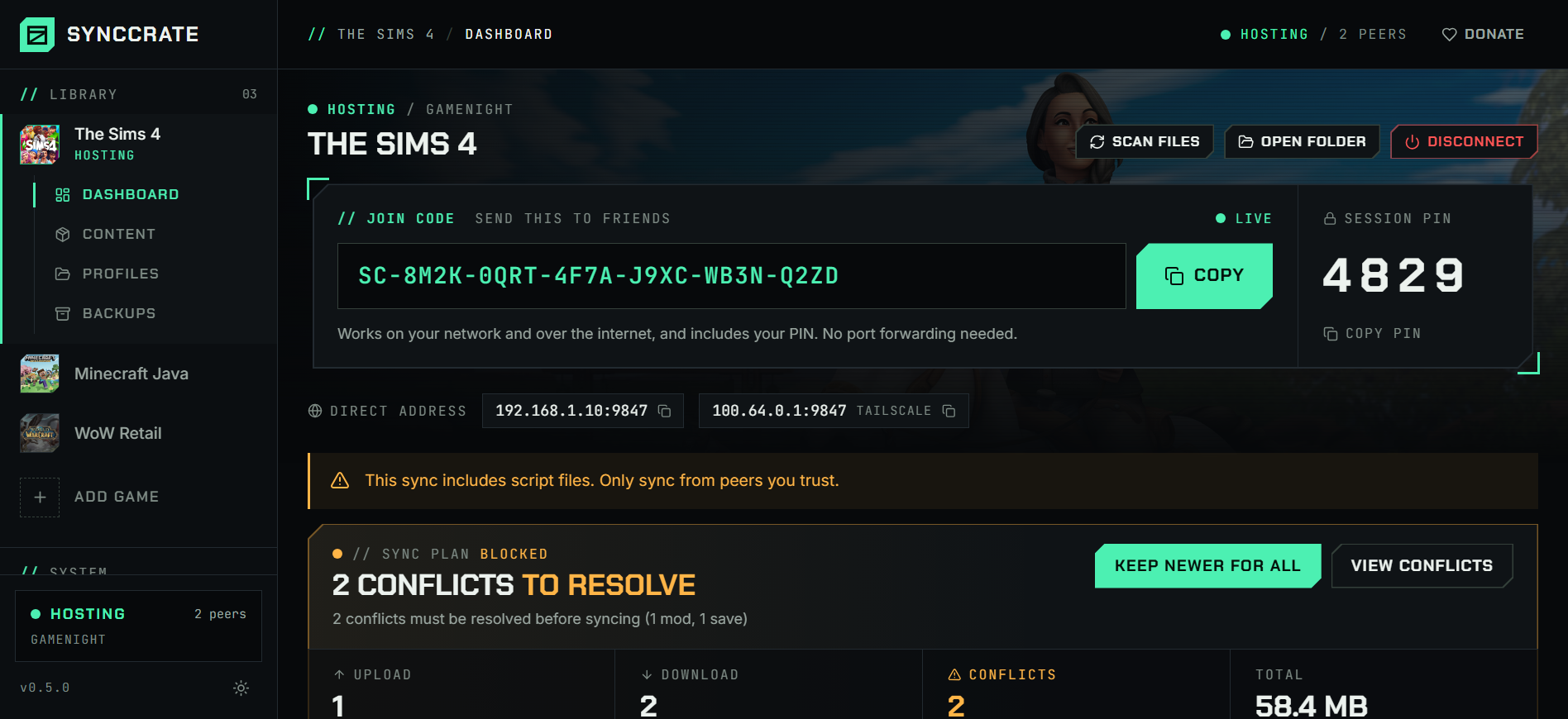
SyncCrate dashboard showing the session overview, the sync plan and connected peers

// 01 Join

One code.
Any distance.

The host clicks Start Hosting and shares an SC-… code. Friends paste it. Same Wi-Fi or the other side of the country, it just connects. No VPN, no port forwarding.

  • DirectPC to PC whenever possible, punching through home routers (powered by iroh).
  • FallbackIf a direct link can't be made, an encrypted relay forwards data it can't read. Files are never stored anywhere.
  • LANOn the same network the fast local connection is used automatically, and Scan for Hosts finds the host with no internet at all. Reconnecting is one click.

TIPAnyone with your code can join. Posting it publicly? Turn on Use PIN.

Animated example: the host copies a join code, a friend pastes it into Join a Session, connects, and syncs 42 files.

// 02 Features

Built for game night,
not for IT.

Sync Only what changed

Skip the 4 GB zip.
Send only what differs.

SHA-256 diffing finds exactly what's different. zstd compression cuts transfers by 50–80%, and every file is hash-verified on arrival. Review the plan with size and time estimates, exclude files or glob patterns, then hit Sync Now.

100–900MB/s on LAN
50–80%less data
+ addBepInEx/plugins/MoreCompany/MoreCompany.dll1.1 MB
~ updBepInEx/config/MoreCompany.cfg3 KB
+ addBepInEx/plugins/LethalThings/LethalThings.dll6.8 MB
~ updBepInEx/config/BepInEx.cfg5 KB
= same1,204 files identical, skipped2.3 GB
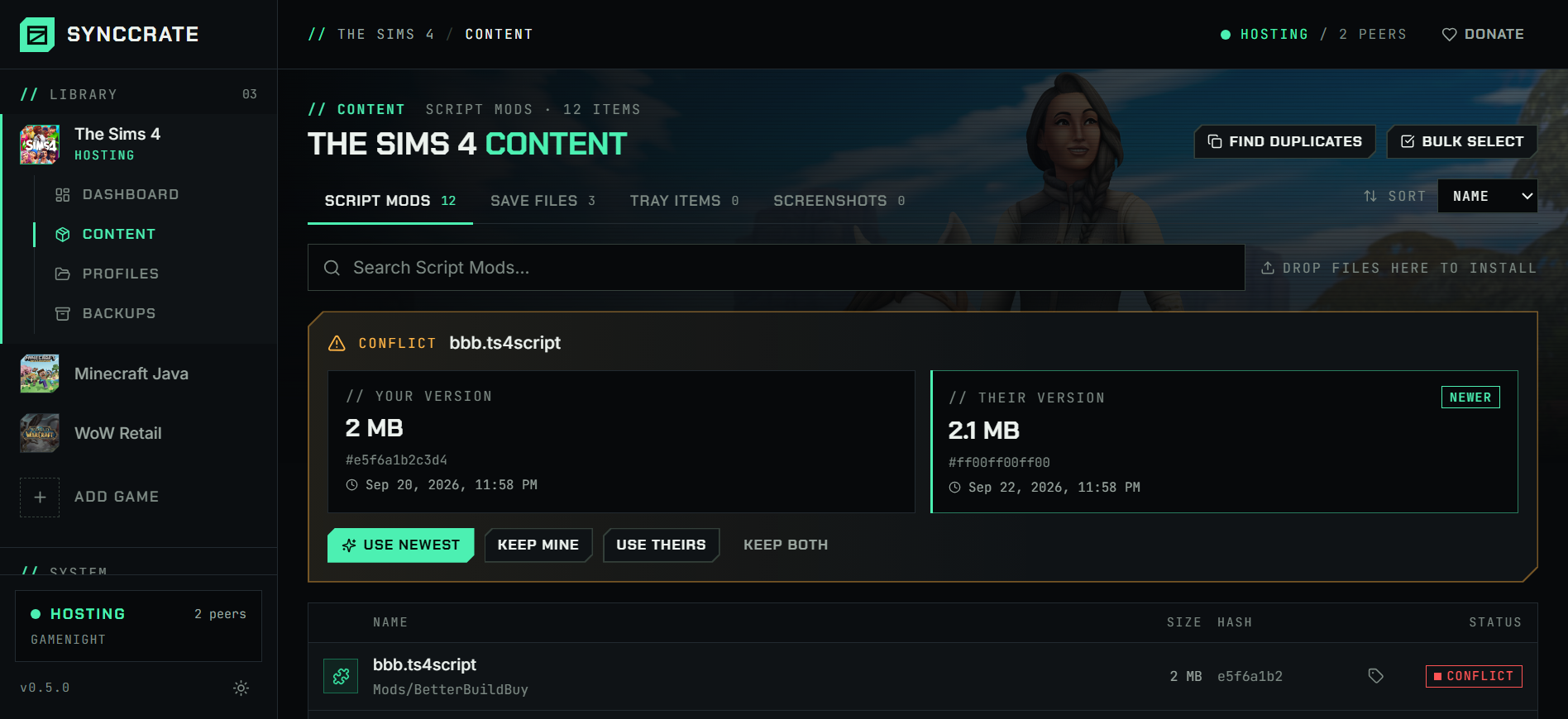
Conflicts Your call

Both edited it? You pick.

Resolve per file. Nothing is replaced until you approve.

Resume No restarts

Wi-Fi dropped? Pick up where it left off.

Cancel or lose the connection mid-sync and it resumes. Desktop notification when done, tray icon while it runs.

Mods Manager built in

Toggle, tag, dedupe.

  • Enable/disable without deleting
  • 12 tags, drag & drop install, pack/DLC detection
  • Duplicate finder
Content browser listing installed mods with tags and enable toggles

Safety Undo button

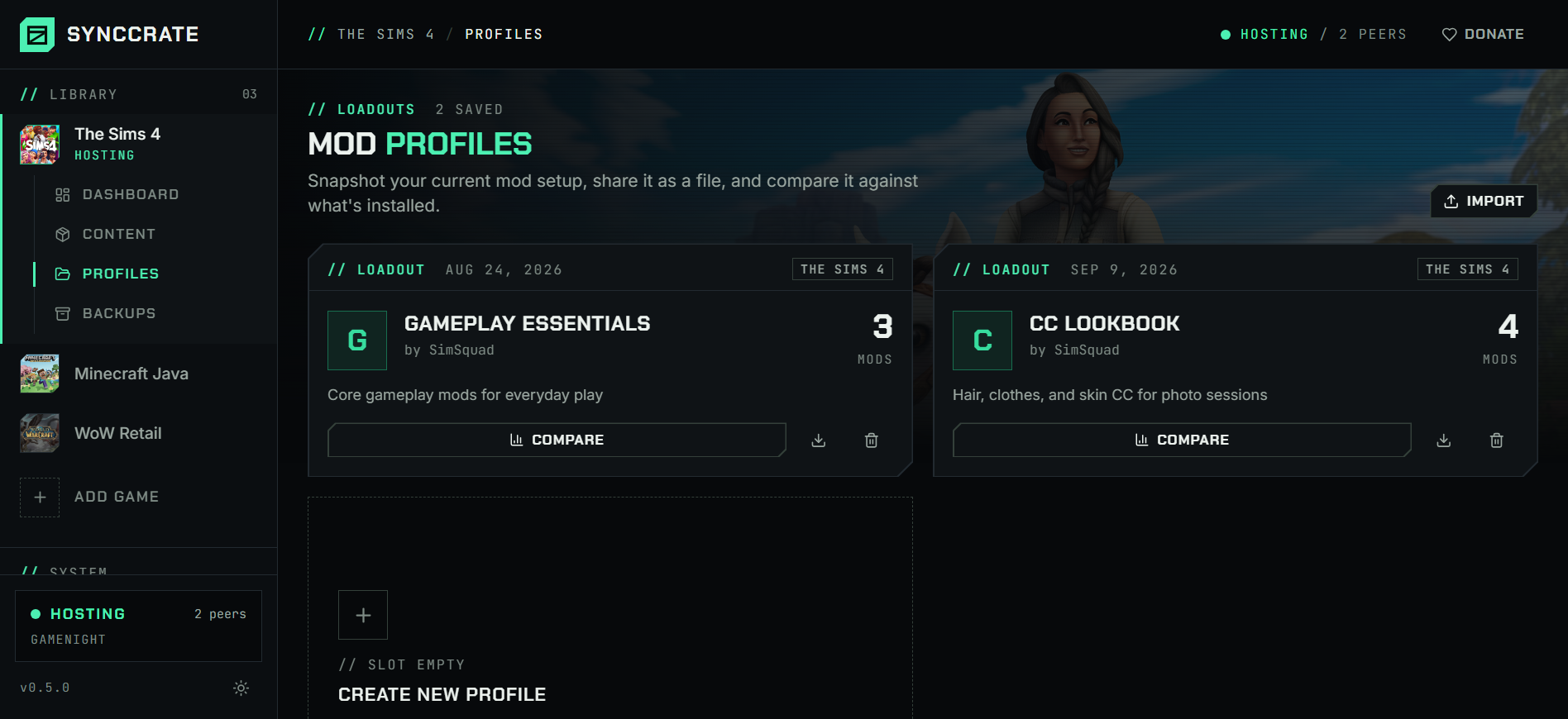
Backups and profiles.

  • Backups before every sync or every 1–24 h
  • Share a setup as a .synccrate-profile on Discord
  • Flags risky scripts (.ts4script, .lua, .jar, .dll)
Profiles screen with saved mod setups ready to share or restore

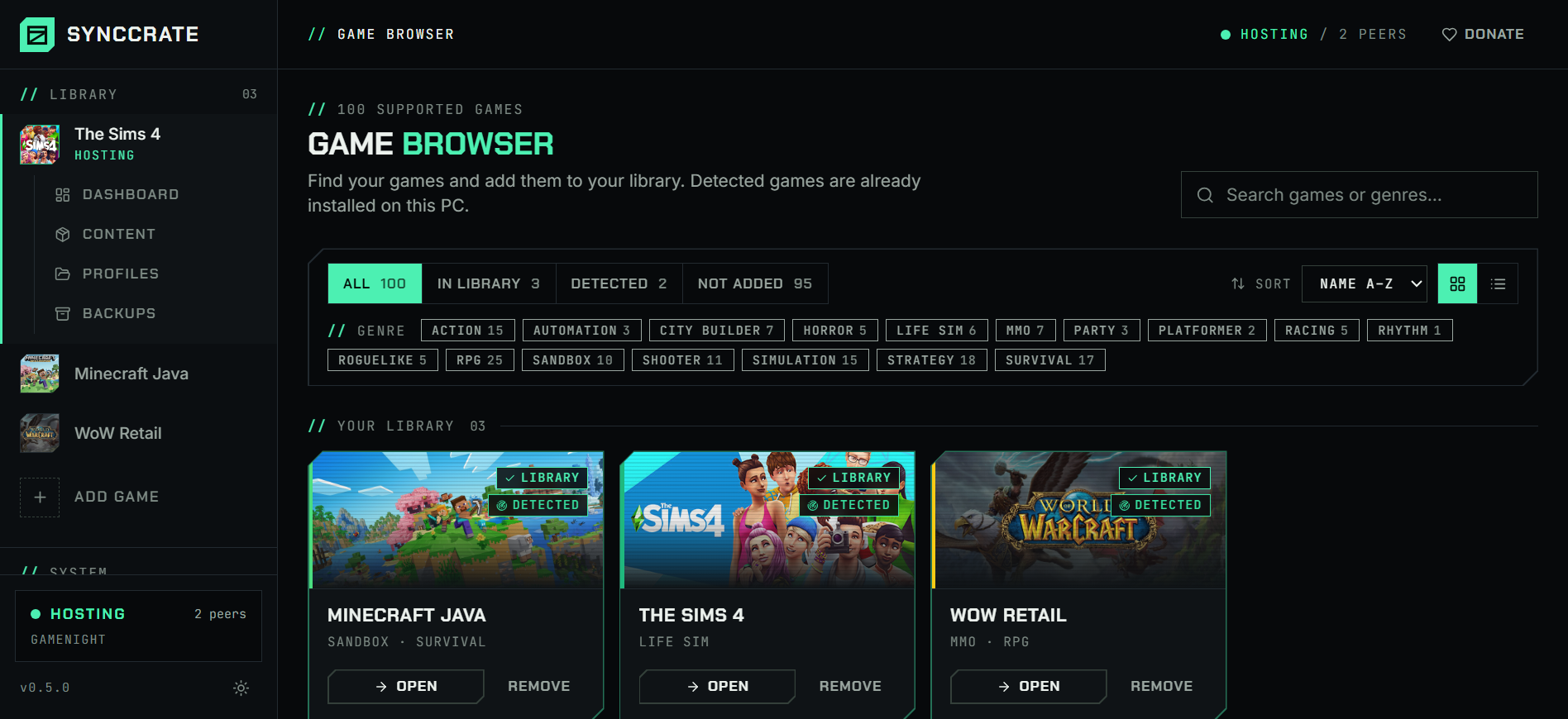
Library Every game, real art

Find your game in seconds.

  • Official box art for all 100 games
  • Filter by genre, installed or in library
  • Grid or list view, set your own cover
Game browser with official box art, genre filters and status tabs

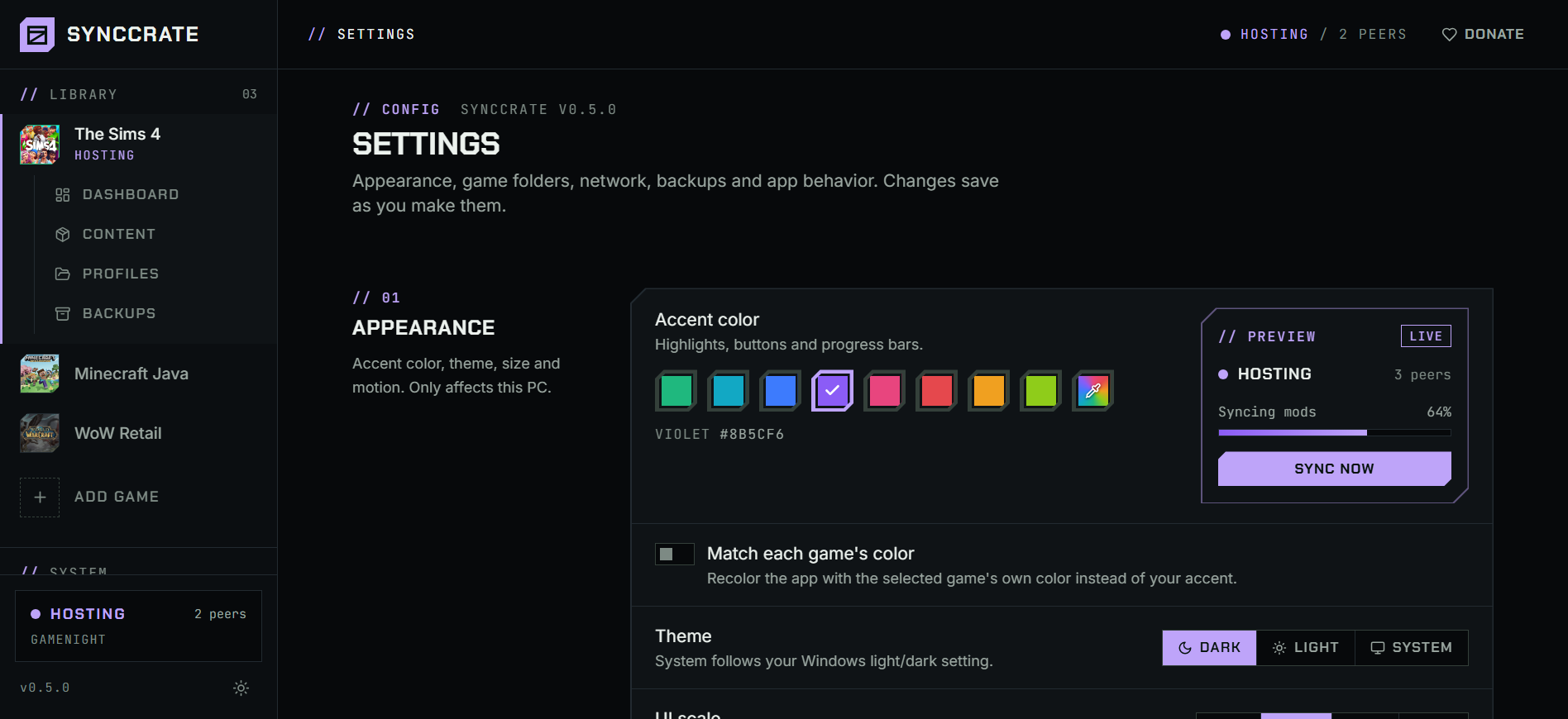
Appearance Make it yours

Your colors, your layout.

  • Pick any accent color, or match each game
  • Dark, light or follow Windows
  • UI scale, compact mode, calm mode
Appearance settings with accent color swatches and a live preview

Connect Finds each other

One host. The whole squad.

Every friend syncs independently, and the host decides which folders are shared. On a LAN it all works without an internet connection.

  • Auto-discovery via mDNS + UDP broadcast
  • Tries every address a host has
  • One-click Windows Firewall fix
  • Network Check shows if the host is reachable
  • Warns if the game is still running
  • Never needs admin to run

// 03 Spotlight

However your
squad plays.

412 MB/S 305 MB/S HOSTING HOST ALEX-PC SAM-PCSYNCED JO-LAPTOPSYNCING 61% RIG-03SYNCED MAYA-PCSYNCING 24% BEN-DESKCOMPARING LOCAL NETWORK · NO INTERNET

LAN party

Bring the PCs, not the zip files. One PC hosts, the rest of the room pulls from it.

  1. 01

    LAN speed

    100–900 MB/s PC to PC on the local network, and only the files that differ are sent. A fresh 20 GB mod folder takes minutes, not the evening.

  2. 02

    No internet? No problem

    Hosts are found by mDNS and UDP broadcast, so Scan for Hosts works on a switch with nothing plugged into the wall. Connect by IP if discovery is blocked.

  3. 03

    One host, the whole room

    Every friend syncs from the same host, independently, whenever they sit down. The host decides which folders are shared.

  4. 04

    Identical before the first match

    Everyone ends up matching the host, every file hash-verified on arrival. No mod mismatch screen when the lobby opens.

// 04 Games

Your library
is probably here.

100
Games supported
67
Game families

Auto-detected across every Steam library on every drive. Missing one? Add it with a few lines of JSON.

Every supported game in one place, with guides for the most-played ones: what syncs, where the folders are, and fixes for the problems that stop a group from playing with the same mods.

Browse all 100 games →

// 05 How it works

Three clicks to
the same game.

  1. Install & add your game

    Install SyncCrate on every PC and add your game in the Game Browser. Its folder is found automatically.

    Game folder detected
  2. Host shares a code

    One friend clicks Start Hosting. Everyone else pastes the code, or picks the host under Scan for Hosts.

    SC-8M2K-0QRT-…
  3. Compare & sync

    Check the plan: what's new, what changed, what conflicts. Then Sync Now.

    Synced 42 files

// 06 FAQ

Before
you ask.

More in the README.

Does it work at a LAN party with no internet?

Yes. On a local network SyncCrate finds hosts with mDNS and UDP broadcast and syncs PC to PC at 100–900 MB/s, no internet connection needed. Friends pick the host under Scan for Hosts, or use Connect by IP. Join codes are for connecting over the internet.

If a PC can't see the host, it's almost always Windows Firewall: see the next answer.

How many friends can sync from one host?

There's no fixed limit. Each friend syncs from the host independently, whenever they're ready, so people can join halfway through the evening.

The host's upload is the bottleneck: friends syncing at the same time share it. For a big LAN party, sync in waves or have people sync before they arrive.

My friend can't connect

It's almost always Windows Firewall. On the host PC click Fix Windows Firewall (shown while hosting and in Network Check), then use Test in Network Check. SyncCrate uses TCP port 9847 for sessions and UDP port 47625 for discovery.

Does it work over the internet?

Yes. Paste the host's join code, nothing else needed. SyncCrate connects directly between PCs when it can, and falls back to an encrypted relay when it can't. The relay only forwards data it can't read; your files are never stored anywhere.

Anyone with your code can join, so turn on Use PIN if you post it publicly. Tailscale or ZeroTier also still work with Connect by IP.

Will it break my mods?

Nothing changes until you approve the sync plan, and existing files are only replaced when you choose to. Every file is hash-verified, risky scripts are flagged, and backups let you roll back. Only sync with people you trust, and make sure everyone runs the same SyncCrate version.

Do I need admin rights?

No. The only exception is a game folder Windows protects, like ReShade/GShade under Program Files. SyncCrate tells you and offers to restart as administrator.

Is there a file size limit?

Up to 2 GB per file, no limit on total size.

macOS says the app is "damaged"

The app isn't notarized yet. Run xattr -cr /Applications/SyncCrate.app once, then open it normally.

Ready when your squad is

Next session starts synced.

Free for Windows, macOS and Linux. Install it on every PC and you're one code away.

.exe · .dmg · .AppImage · .deb  /  All releases